Qwen3.8-27B Uncensored: Hardware Requirements and LM Studio Setup
Run the HauhauCS Qwen3.8-27B Uncensored GGUF locally: VRAM and unified-memory requirements, two example PC builds, Mac options, and a step-by-step LM Studio setup.
Published August 19, 2026. Adapted from the author's original Chinese article on Zhihu.
The community-built Qwen3.8-27B Uncensored HauhauCS Aggressive release removes many of the refusal behaviors found in the base model while retaining Qwen3.8-27B's reasoning, agentic, image, and video capabilities. The GGUF release also includes MTP support for faster generation in compatible runtimes.
At 27 billion dense parameters, this is one of the strongest model classes that remains practical on a single high-memory consumer GPU. The Q3 quantization can fit on a 16 GB card, while Q4 is a better-quality option for 24 GB GPUs or Macs with at least 24–32 GB of unified memory.
An "uncensored" model is not automatically more accurate or more capable. It has fewer behavioral safeguards, which places more responsibility on the operator. Validate important outputs, restrict tool permissions, and follow the laws and policies that apply to your use case—especially before connecting the model to a local agent.
Hardware Requirements
Here are the practical minimums for the two quantizations discussed in this guide:
| Quantization | Approx. Model Size | Practical Memory Requirement | Best For |
|---|---|---|---|
| Q3_K_P | 14.4 GB | 16 GB VRAM | Trying the model on a 16 GB desktop GPU |
| Q4_K_P | 18.8 GB | 24 GB VRAM or 24–32 GB unified memory | Better quality and more context headroom |
The full BF16 model is roughly 55 GB. Quantization compresses the weights so the model requires much less memory. Q4 usually preserves quality well for everyday use; Q3 saves more memory but comes with a more noticeable quality tradeoff.
Model size is not the entire memory budget. Long context windows, vision inputs, and GPU offload settings add overhead. A model file that nearly fills your VRAM may leave too little room for a useful context length.
Desktop GPU Options
- RTX 5060 Ti 16 GB: Can run the Q3 quantization, but leaves little room for longer context windows.
- RTX 4090 24 GB: Can run Q4 and offers substantially faster inference with more context headroom.
- RTX 5090 32 GB: The fastest consumer option in this comparison, with enough memory for Q4 and more demanding contexts or multimodal workloads.
Example RTX 5060 Ti 16 GB Build
| Component | Suggested Specification |
|---|---|
| CPU | AMD Ryzen 5 5600 |
| Motherboard | B550M |
| Memory | 32 GB DDR4 (2×16 GB) |
| GPU | RTX 5060 Ti 16 GB |
| Storage | 1 TB NVMe SSD |
| Power Supply | 750W 80 Plus Gold |
| Case and Cooling | Basic air cooling and case |
This is the lower-cost route, but it limits you to Q3 and leaves little VRAM headroom. If local AI is the machine's primary purpose, a 24 GB GPU is the more flexible long-term choice.
Example RTX 5090 32 GB Build
| Component | Suggested Specification |
|---|---|
| CPU | AMD Ryzen 7 9700X |
| Motherboard | B850M |
| Memory | 64 GB DDR5 (2×32 GB) |
| GPU | RTX 5090 32 GB |
| Storage | 2 TB NVMe SSD |
| Power Supply | 1,200W Gold, fully modular |
| Case and Cooling | 360mm AIO and case |
Unless you specifically need local data privacy, offline access, or sustained high-volume inference, compare the cost of a new system with cloud API usage before buying dedicated hardware.
Apple Silicon Options
Apple Silicon uses a unified-memory architecture: the CPU and GPU share the same memory pool. A 32 GB Mac can hold the approximately 18.8 GB Q4 model while retaining reasonable space for macOS and context overhead.
- MacBook Pro M5 with 32 GB unified memory: Active cooling makes it better suited to long inference sessions than a fanless MacBook Air.
- Mac mini M4 with 32 GB unified memory: A compact, quiet option for a home server; remember that it requires a separate display and peripherals.
Choose a Mac if you value quiet operation, power efficiency, and a compact system. Choose an NVIDIA desktop if maximum generation speed and broader inference-tool compatibility matter more.
How to Run Qwen3.8-27B Uncensored in LM Studio
LM Studio is the easiest option for beginners because it provides a complete graphical interface on Windows and macOS.
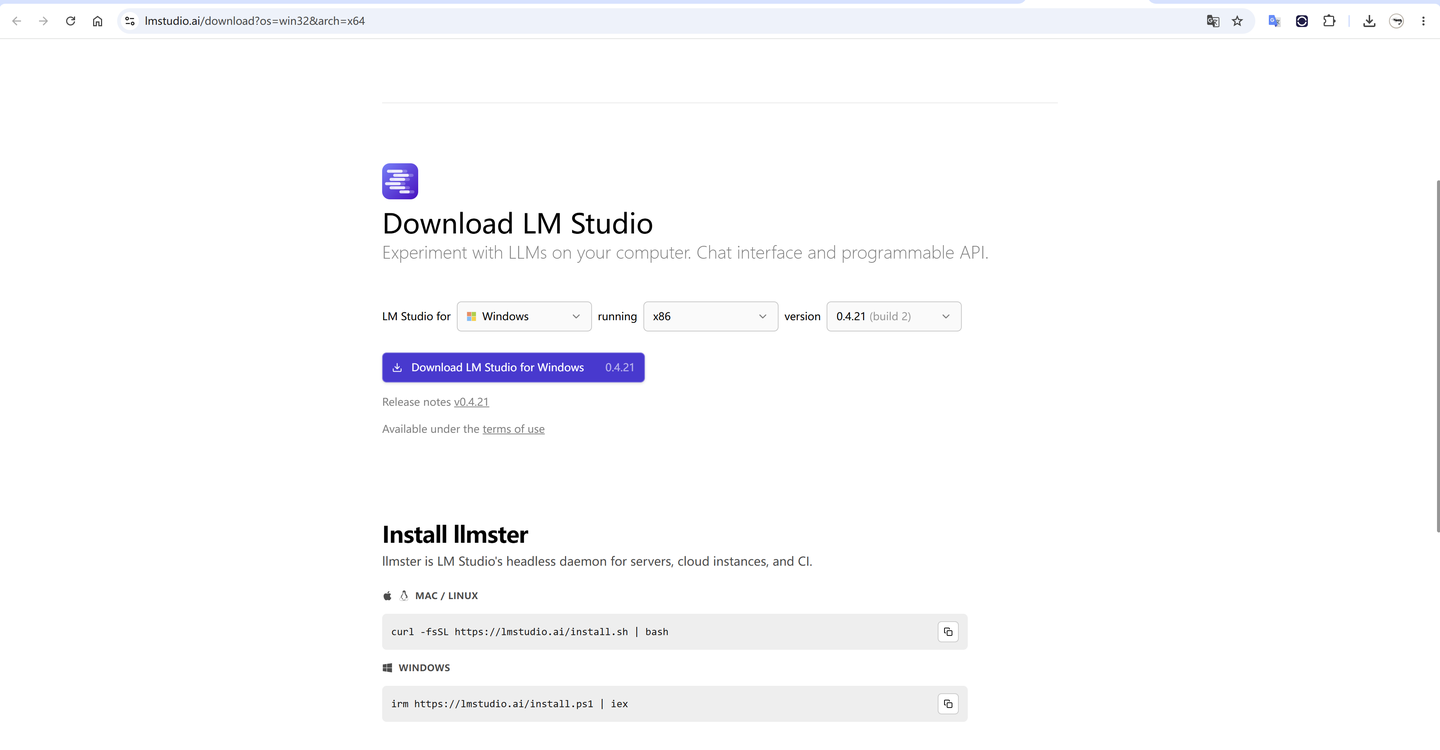
1. Install LM Studio
Download the current version from lmstudio.ai and install it for your operating system.
2. Find the GGUF Release
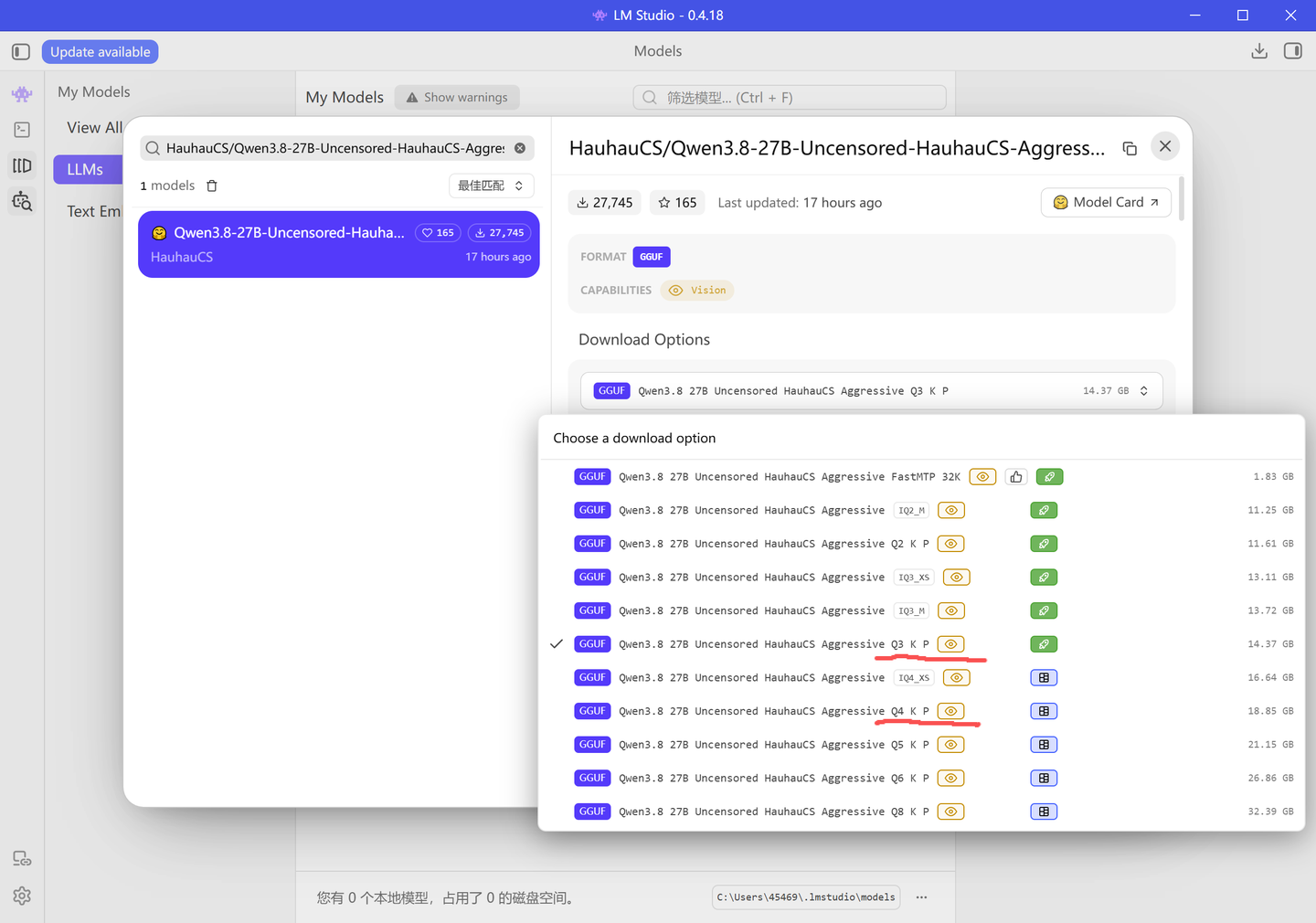
Open LM Studio's model search and enter:
HauhauCS/Qwen3.8-27B-Uncensored-HauhauCS-Aggressive-MTP-GGUF
You can also review the files and model card directly in the Hugging Face repository.
- For a 16 GB GPU, download the Q3_K_P quantization.
- For a 24 GB GPU or a Mac with sufficient unified memory, choose Q4_K_P for better quality.
3. Load the Model and Start Chatting
After the download completes, open LM Studio's chat interface, select the model, and load it. You can then use it locally without sending prompts to a hosted model provider.
Common Setup Issues
- Disk space: Keep at least 30 GB free before downloading. The model file is large, and the app needs additional working space.
- Slow first load: Initial loading can take anywhere from several seconds to more than a minute. This is normal.
- GPU not detected on Windows: Install the latest NVIDIA driver and restart LM Studio.
- Out-of-memory errors: Reduce the context length, close GPU-heavy applications, or move to a smaller quantization.
- Vision input not working: Confirm that LM Studio also downloaded and loaded the matching multimodal projector file when the release requires one.
Start with a short context window and confirm that basic text generation works before enabling a large context or vision input. This makes VRAM problems much easier to diagnose.
Can You Use It With llama.cpp or Ollama?
Yes. GGUF is the native model format used by llama.cpp and is supported by several compatible runtimes. LM Studio is the simplest route, but advanced users can run the same model with a recent llama.cpp build. See What Is llama.cpp and How Do You Use It? for the original Chinese walkthrough.
Ollama can also import GGUF models, although you may need a local Modelfile instead of relying on a prebuilt Ollama library tag. Verify the exact filename and runtime compatibility on the model repository before downloading.
Is This Model Worth Running Locally?
Qwen3.8-27B is attractive if you want a capable dense model with local privacy, multimodal input, and fewer refusals than the official release. But the uncensored derivative is very new, and early users may encounter sampler sensitivity, mixed-language output, or runtime-specific issues. Treat it as an experimental community build rather than a drop-in production model.
For most people, the decision comes down to memory:
- 16 GB GPU: Q3 works, but expect reduced quality and limited context headroom.
- 24 GB GPU: Q4 is the recommended desktop target.
- 32 GB Apple unified memory: Q4 fits comfortably enough for normal use.
- Buying an entirely new system: Compare cloud costs first unless privacy, offline access, or continuous local usage is a hard requirement.